 LegacyAuditPro
Make sense of the Excel files nobody understands.
Audit what is broken. Rebuild what you need. Give your team a search box over every live workbook. $10, once.
No subscription. No licence key. Windows 10 and 11. Excel not required.
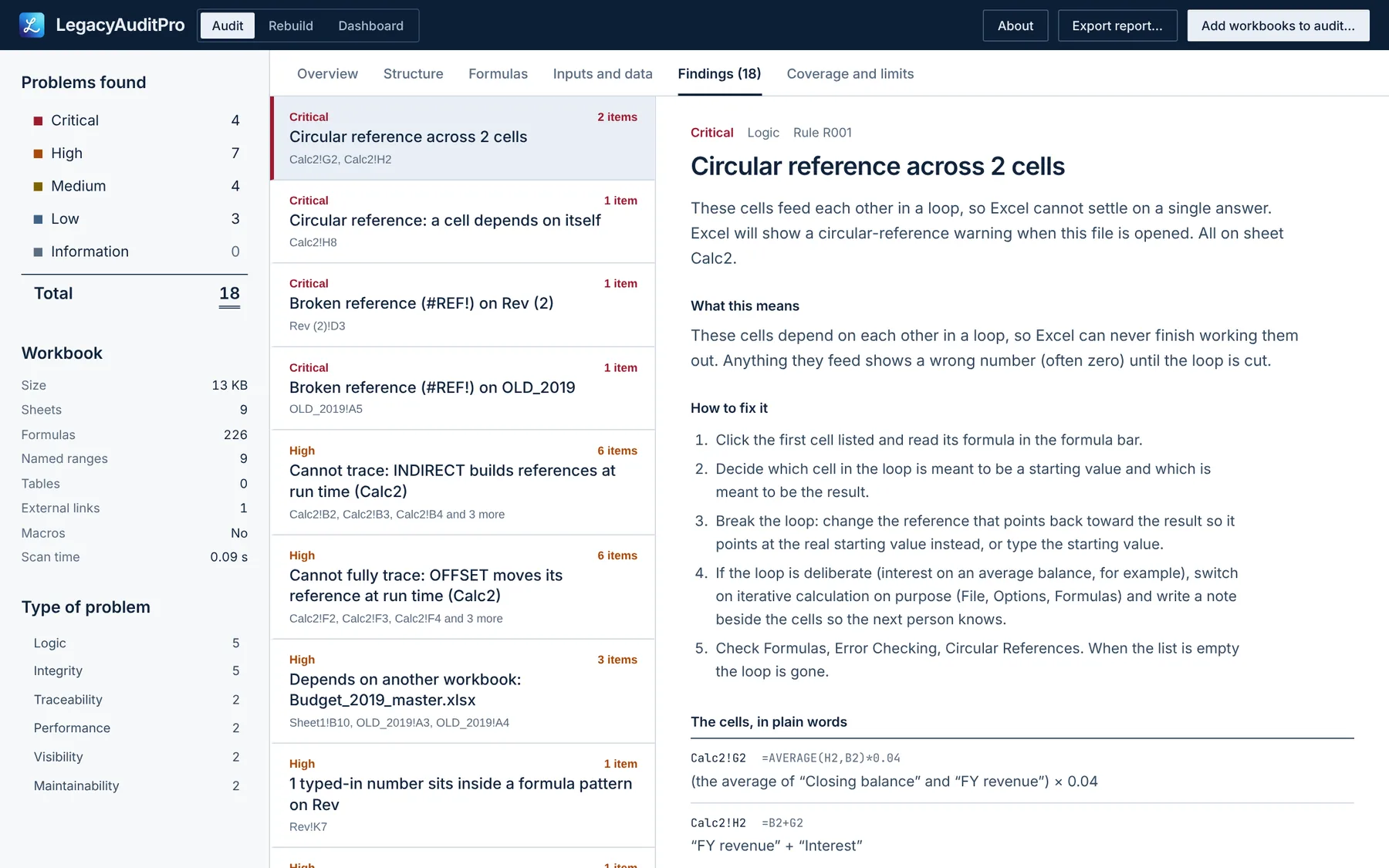
Measured by running the app on the example files. Your computer and files will differ.
Audit
Every problem in the file, in plain English.
- Circular references, #REF! errors, hidden sheets, links to other files
- What each problem means, and how to fix it cell by cell
- Corrupted file? It names the sheets it could not read
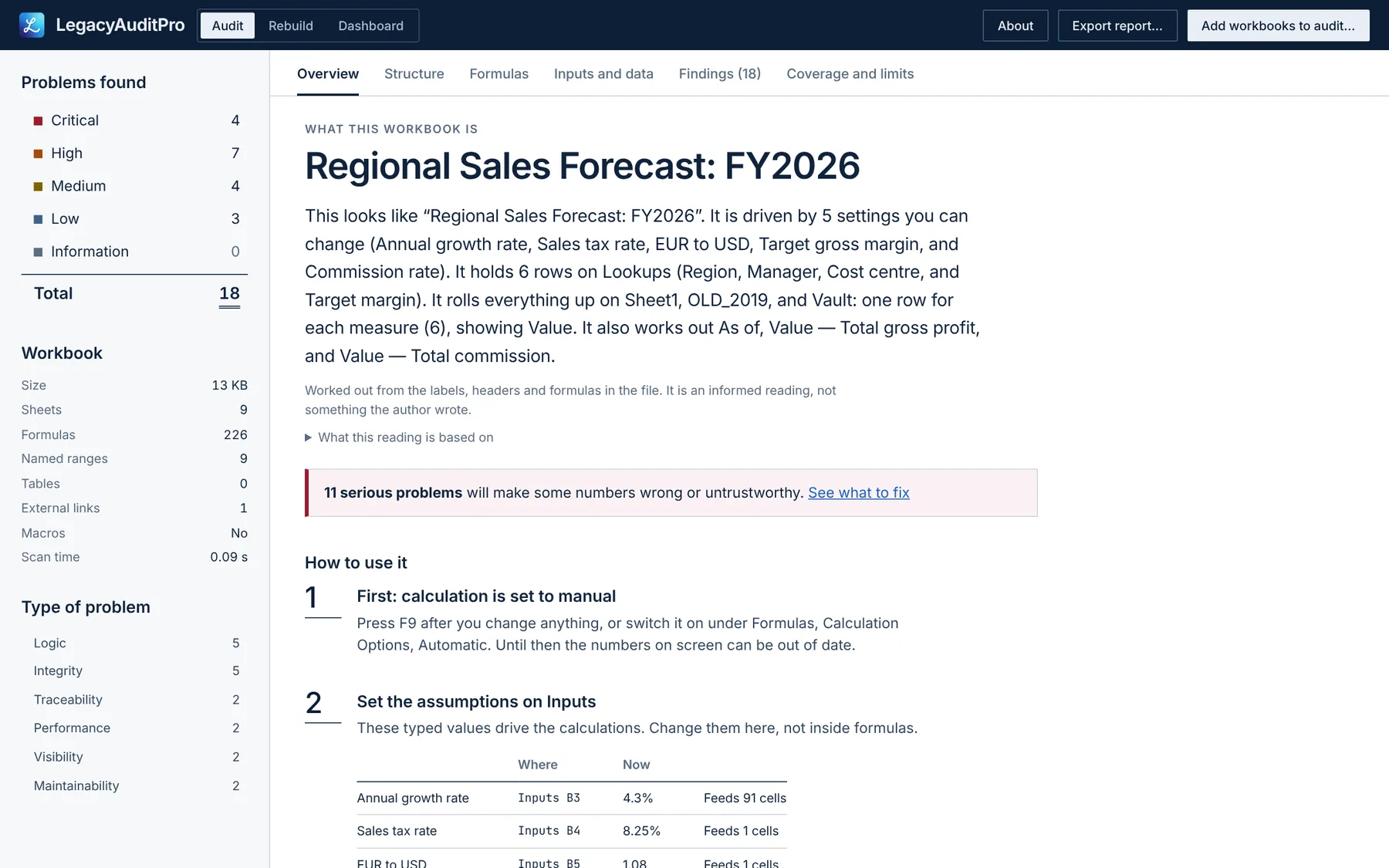
Rebuild
Turn a pile of old workbooks into the one you wanted.
- Drag across any cells and drop them into a new sheet
- Red marks what you have already taken, so nothing is taken twice
- Exports clean files, and your originals are never touched
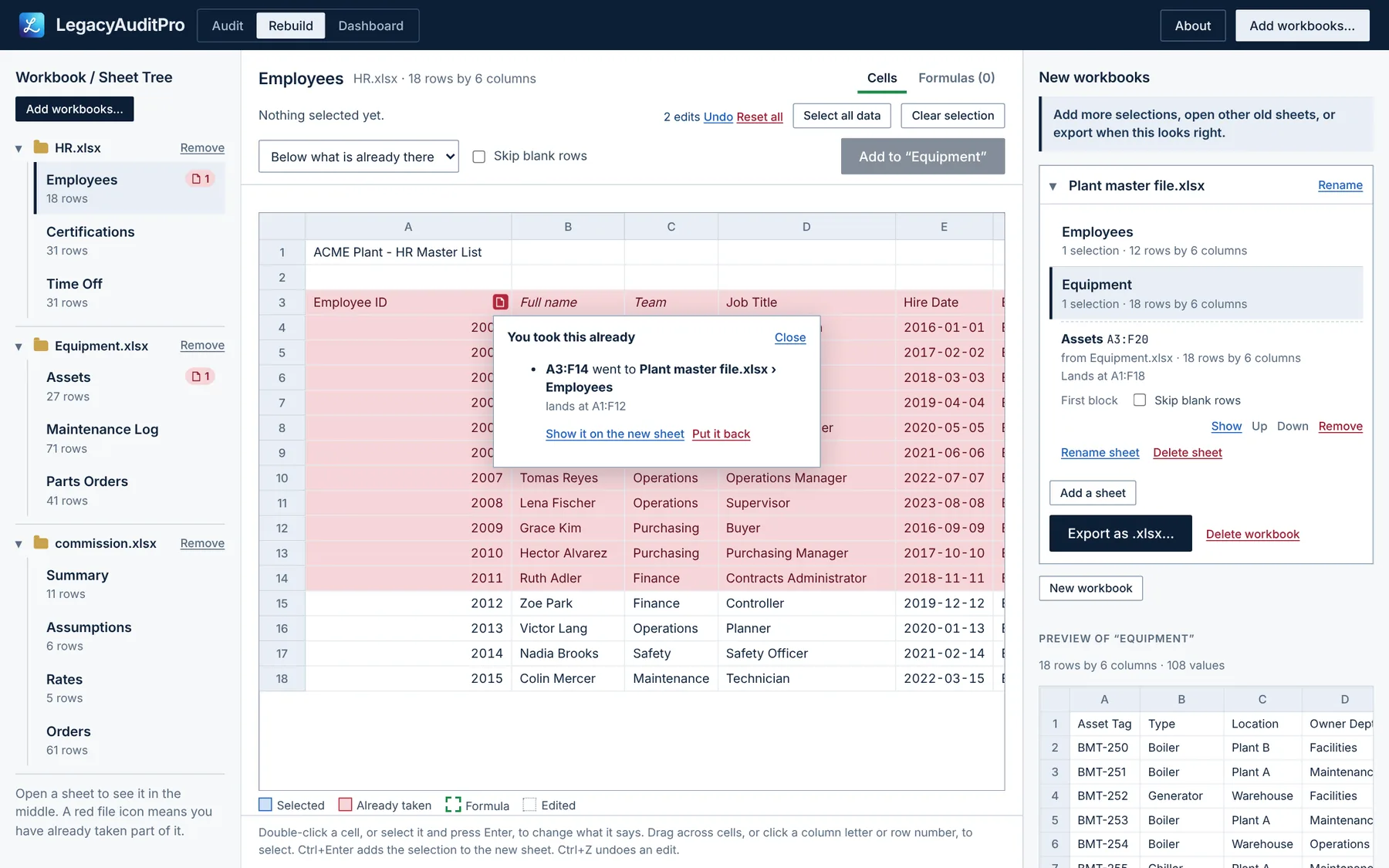
Dashboard
Type it wrong. It still finds it.
- Search every workbook at once, and follow a name or tag across files
- Save in Excel, and everyone sees the new version seconds later
- Works on shared drives and OneDrive folders, for the boss who just wants to look something up
Try each one on your own files first.
Free, cut short on purpose, and nothing leaves your computer.
Your workbook stays yours.
It only reads. It cannot change your file or send it anywhere.
- Never writes to your workbook
- Runs on your PC with no sign-in, no tracking and no uploads
- Does not need Excel installed
One simple price, for the whole team.
- The full Windows app: Audit, Rebuild and the live Dashboard
- Every update, with no renewals and no licence file to keep up to date
- One purchase per person, so a whole team can have it at a small price
- Questions answered by the person who built it
No refunds at the moment. It is one payment and you are never charged again. Try the free preview first. Questions or problems: rafriv84@icloud.com. See the refund policy and terms.
Questions
What does LegacyAuditPro do?
It is a Windows app with three tools. Audit opens an Excel workbook and tells you, in plain English, what it is for and every problem it can find, with steps to fix each one. Rebuild lets you pick the parts you need from old workbooks and assemble clean new ones. Dashboard connects to the folder where your live workbooks are saved and gives your team a searchable view that stays up to date as people save in Excel.
Will it change my workbook?
No. LegacyAuditPro only reads your file. It never writes to it. Anything it creates, like a rebuilt workbook or a report, is saved as a new file in a place you choose. Even so, always open a copy of an important workbook rather than the original. See the Terms of use.
Are my files uploaded anywhere?
No. The desktop app blocks all network access for your workbooks while it runs, so they cannot leave your computer through it. The one optional exception is a switch, off by default, that lets the app ask this website for the latest version number. It sends nothing about you or your files. The free preview on this site also runs inside your browser tab: the files are read on your computer and are not sent to our server. The only thing it reports back is an anonymous count that a preview happened, with no file name and no content.
How does the Dashboard stay up to date?
You connect a folder (or a few workbooks) once. The app then checks it every few seconds, and a moment after anyone saves a workbook in Excel the Dashboard shows the new version. New workbooks added to the folder appear on their own, and deleted ones disappear. It works with folders on shared network drives and synced folders such as OneDrive. Excel can stay open while this happens. Only saved changes show up, so something typed into Excel but not saved yet is not in the file. If a workbook is locked or damaged at that moment, the last good copy stays on screen and the app tries again.
Do I need Excel installed?
No. LegacyAuditPro reads the workbook file itself, so it works on a PC without Excel.
Which files does it open?
Excel workbooks ending in .xlsx or .xlsm, up to 600 MB in the desktop app. Older .xls and binary .xlsb files are not supported yet: open them in Excel, choose Save As, and pick Excel Workbook (.xlsx). Workbooks with an open password must have the password removed in Excel first.
What happens if the workbook is damaged?
LegacyAuditPro reads every sheet it can and names the ones it cannot. A damaged sheet is reported as a critical problem with advice on recovering it, so a clean-looking result never hides a hole. It does not repair the file itself.
What about macros?
It tells you when a macro project is present, and lists that macro code was not read. What macros do to cells and formulas is outside the audit.
How accurate is it?
The findings are patterns that are usually mistakes or risks. Each one should be confirmed by someone who knows the model, and the app says so. The Coverage tab shows exactly what was read and what was not, so you can judge a result.
What does the free preview show?
All three tools, cut short, running in your browser. The Audit shows your workbook's overview and the title of every problem, and explains the first three (the first with fix steps). Rebuild lets you pick cells from one sheet and watch a new sheet take shape, but not export it. Dashboard finds how two or three workbooks link and lets you search them, showing about half of the results. None of it is uploaded. The full app shows everything, exports rebuilt workbooks, and keeps the Dashboard up to date from your folders.
What do I get for $10?
The Windows app with all three tools (Audit, Rebuild and Dashboard) and every update. You pay once. There is no subscription, nothing renews, and there is no licence file to keep up to date. Each person who uses the app needs their own copy, so a team of five is five purchases.
Do I have to sign in or stay online to use it?
No. After you download it, the app runs on your computer without signing in and without an internet connection. It does not check that you paid. You only need your account on this website to download the installer, now or later, including newer versions.
Is there a refund?
Not at the moment. It is one payment, so there is nothing to cancel and you are never charged again. Try the free preview with your own workbooks first. If something is wrong or you were charged by mistake, email me directly and I will read it. See the refund policy.
Does it run on a Mac?
Not yet. LegacyAuditPro is a Windows 10 and 11 (64-bit) app today. A Mac version is planned, with no date yet.
Why does Windows show a warning when I install?
Windows SmartScreen can show a blue “Windows protected your PC” screen for software from a new publisher until enough people have installed it. If you downloaded it from your account on this site, choose “More info” and then “Run anyway”. Your account page also lists the file’s SHA-256 checksum so you can verify the download.
Stop guessing what the spreadsheet does.
Load your own workbooks in the free preview. It takes seconds, and nothing leaves your computer.